Feature overview

Complete feature overview

Every tool you need for your whole school sports year — carnivals and year-round house competitions alike. Plan, run and report on it all, then clone it forward so every season takes less time than the last.

Student Management

Central student database with powerful import and filtering tools

CSV Import Wizard

Three-step guided import: upload → smart DOB-to-age-group conversion → preview and confirm. Detects duplicates by name, handles update vs create, and supports 12+ column types.

Smart Duplicate Detection

Exact name match, single-candidate name match, and ambiguous deferral — so every import row is handled correctly without data loss.

Rich Student Profiles

First/last name, gender, DOB, house, year level, class group, age group (primary and secondary), student code, Azure OID for SSO linking.

Auto-Generated Student Codes

YYYY-NNNN format auto-assigned per tenant per year. Editable override allowed. Ensures every student has a unique, trackable identifier.

Live Search & Filtering

Search by name or code, filter by house, year level, age group, gender, and class group simultaneously. 30 per page with state-preserving pagination.

PE Class Assignment

Assign students to one or more PE trial classes directly from the student edit form. Synced on save with validation to prevent data corruption.

Soft-Delete Guard

Students with recorded results cannot be deleted — an audit trail is preserved. Administrators are warned and guided to deactivate instead.

Bulk Actions

CSV template download, house reassignment, and activation status toggle for selected students.
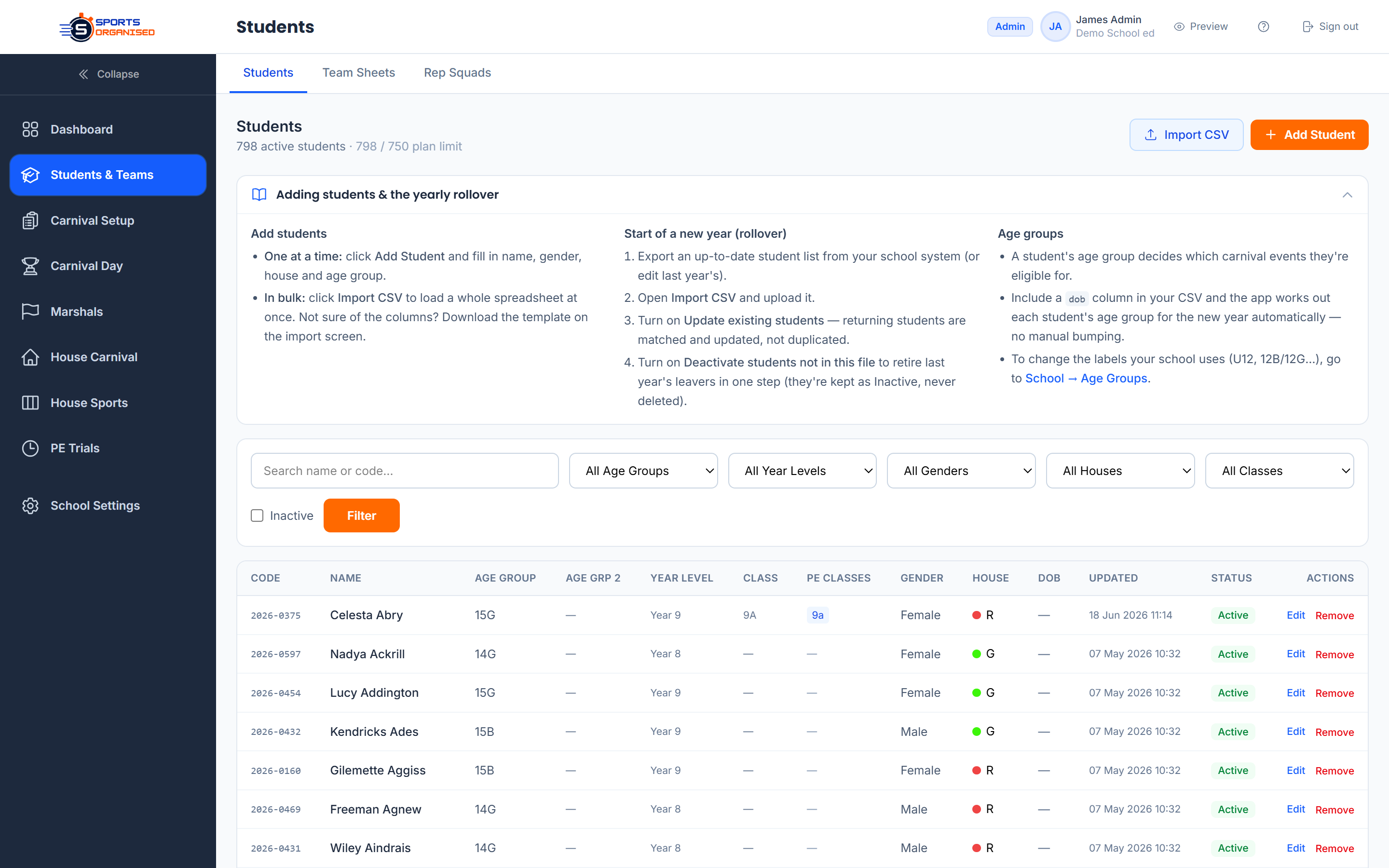
Screenshot: Student list with search, filters and CSV import

Carnival Setup & Configuration

Full lifecycle management for each carnival, from planning to completion

Carnival Management

Carnival CRUD — Create, edit and delete carnivals. Type (athletics/swimming/sports day), date, start/end times, status (draft → active → completed).
Carnival Cloning — Roll last year's carnival straight into this one — events, schedule, locations, points tables and staffing all copy across in a click. Just set the new date and adjust. What took weeks the first time takes an afternoon every year after.
Age Groups Manager — Define carnival-specific age brackets (e.g. "10 Girls", "11 Boys", "Combined 12–14"). Control sort order, visible in events, nominations, and results.
Locations Manager — Named venue areas (e.g. "Track A", "Long Jump Pit") with sort order. Linked to events and displayed on schedules and score sheets.
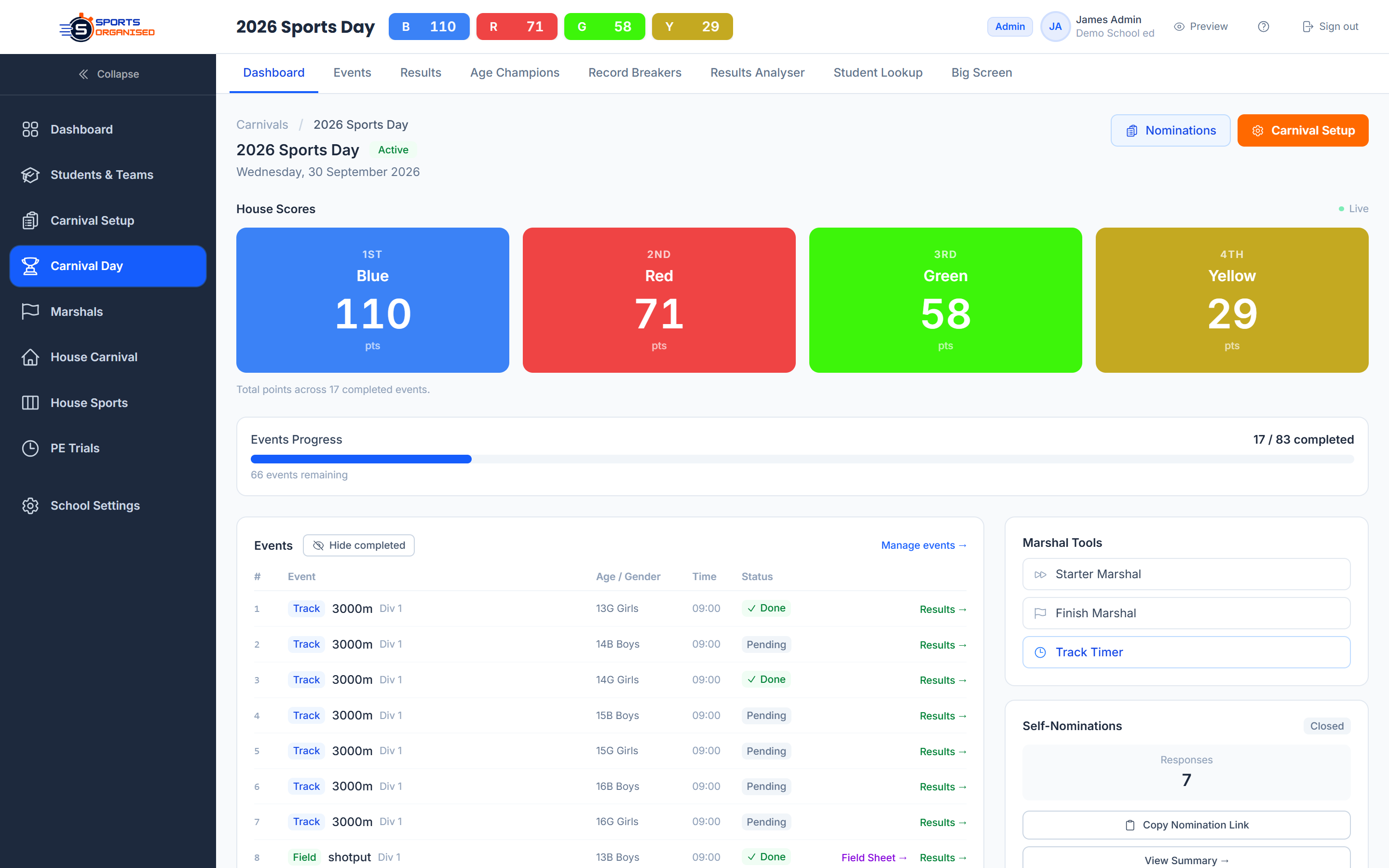
Points Table Editor — Visual editor for multi-division scoring. Set points per position 1–10 (positions beyond 10 auto-score 1 pt). Quick-apply preset templates.
Settings Hub — Generate/revoke self-nomination links with date gates, generate public results tokens, view self-nomination counts, configure champion caps and nomination limits.

Schedule Builder

Time Modules — Named time blocks (e.g. "Track Heats 9:00–10:30"). Supports pre-day setup modules and multi-day carnivals.
Drag-Drop Builder — Assign events to modules via card view, matrix view (age groups × modules), quick edit, or bulk assign with search.
Quick-Setup Wizard — Auto-generate N evenly-spaced time modules across the carnival day with a single form.
Matrix View — Overview grid showing which events are scheduled in which module across all age groups. Great for detecting gaps or conflicts.
Print Schedule — A4 landscape schedule matrix — ready for bulletin boards, staff briefings, and program booklets.
Module Duplication — Duplicate time blocks and their event assignments when cloning a carnival or building a repeated structure.
Screenshot: Carnival setup hub with progress and event status

Events Management

Six event types, full record tracking, bulk import and flexible configuration

Event Types

Track

Time-based (min:sec.cs). Supports heats, finals, and auto race creation.

Field

Distance-based (metres.cm) with up to 3 attempts. Best attempt auto-calculated.

Swim

Time-based, same structure as track. Separate from athletics events.

Relay

Team time-based. Linked to team members. No individual heats.

Team

House-based scoring via time, position, or points. Used for sports day round-robins.

Standards

Distance + achievement zones (Gold/Silver/Bronze). Fixed zone thresholds per event.

Event Configuration

Per-event records — Record value (DECIMAL), record holder name, record date. Auto-flagged when broken during results entry.
Attempts — Field and standards events: 1–5 attempts. Best attempt auto-selected. Foul tracking per attempt.
Max per house — Limit the number of students a single house can nominate per event.
Division labels — Tag events to scoring divisions (e.g. "Individual", "Relay") for separate champion calculations.
Auto-nominate — Field and standards events can auto-nominate all eligible students, removing manual nomination step.
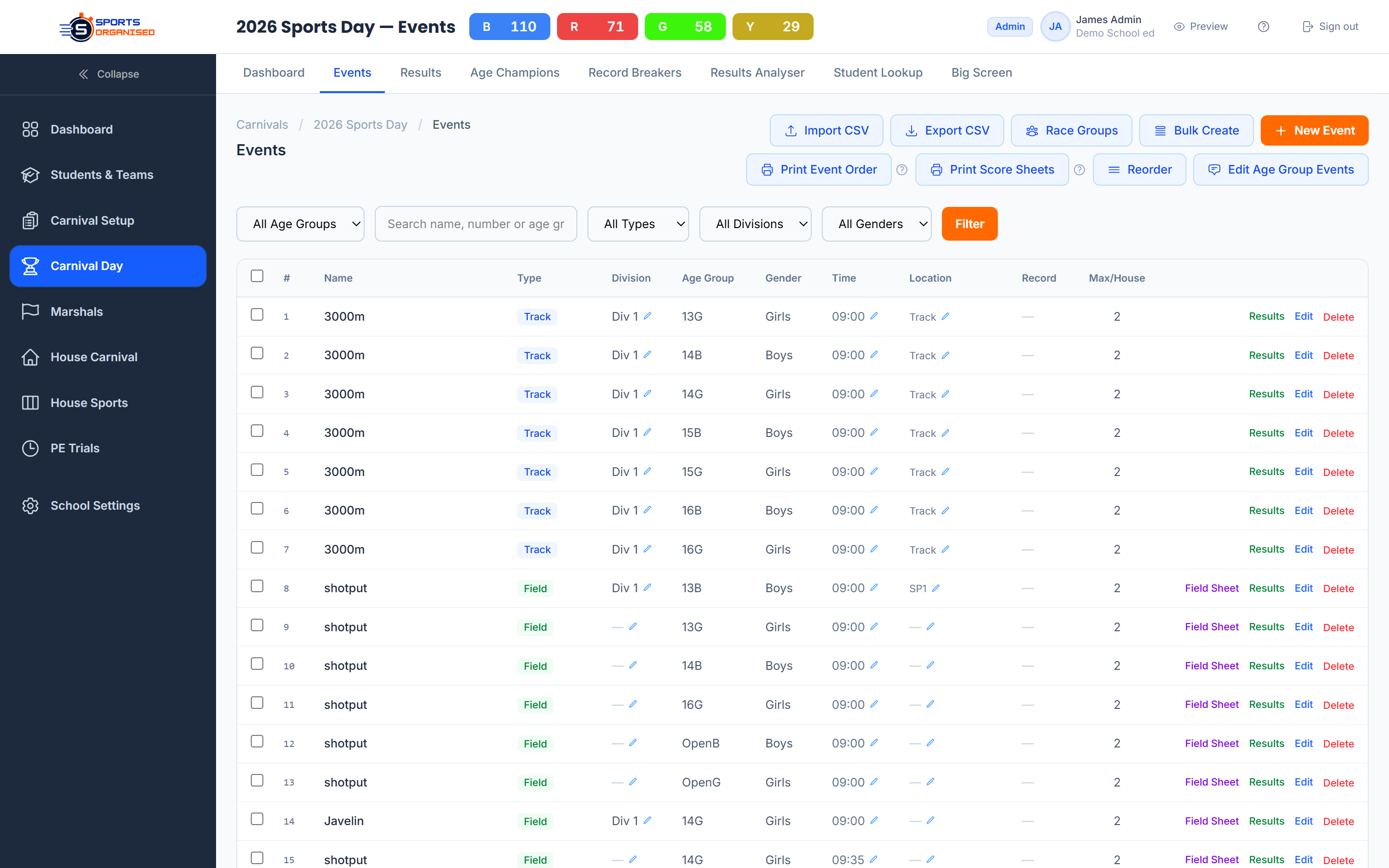
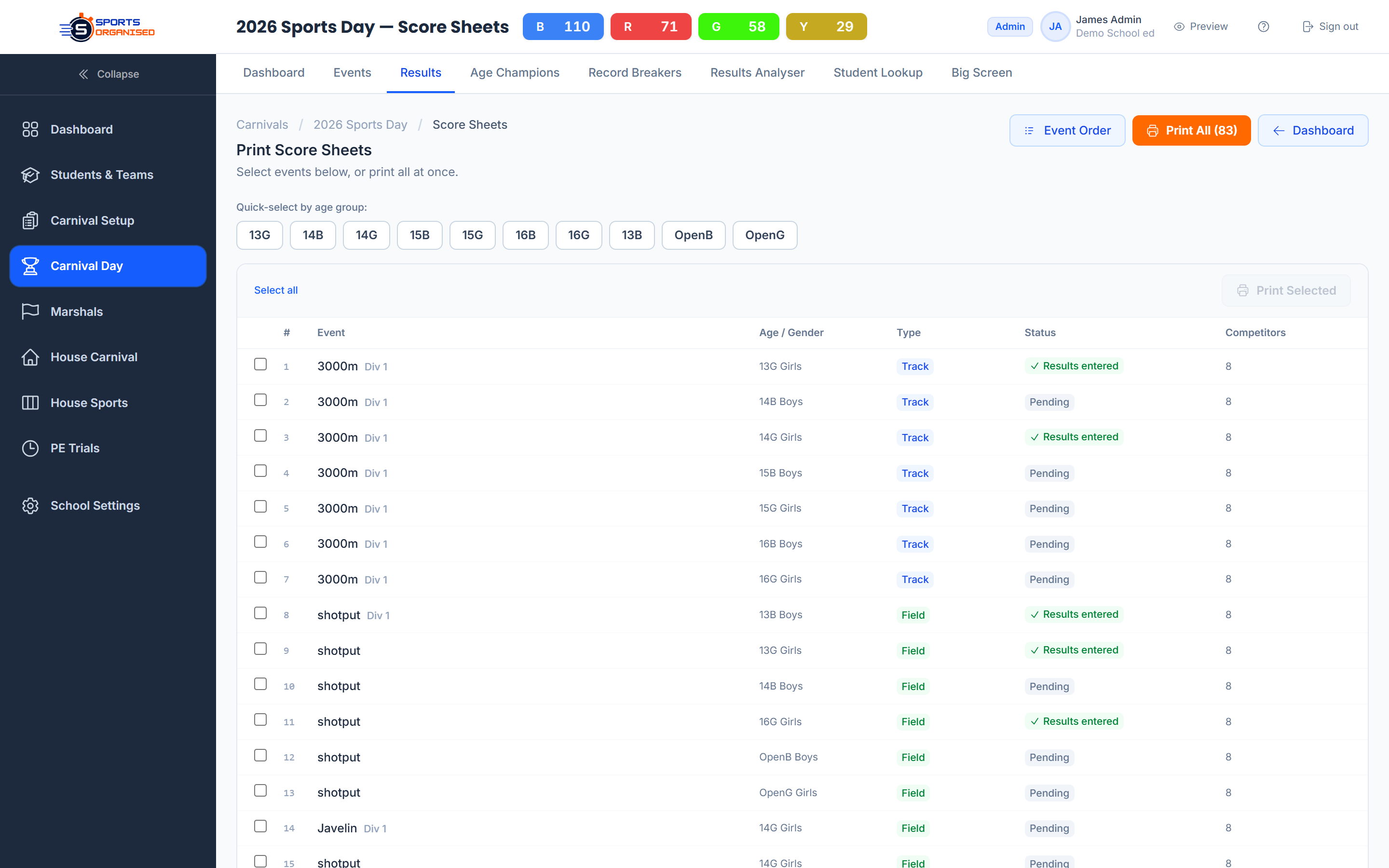
CSV Bulk Import — Import a full event list via CSV in three steps. Validates event number, type, age group, gender, and generates slots idempotently.

Event Organisation

Unique event numbers — Every event has a unique number per carnival. Used for ordering, referencing on score sheets, and display on programs.
Race groups — Group track and swim races into named groups (e.g. "100m Sprint Group") for marshal coordination and bulk finishing.
Bulk create form — Quick entry form to create multiple events at once from a single screen without navigating away.
Filter & search — Filter by type, age group, gender, division, and free-text search by name or number.
Standards zones — Define achievement levels per event with custom names, values, and sort order.
Schedule assignment — Assign events to time modules and locations directly from the event list or schedule builder.
Screenshot: Events list with filters and bulk tools

Nominations & Self-Entry Portal

Staff nomination management and a public self-nomination portal for students

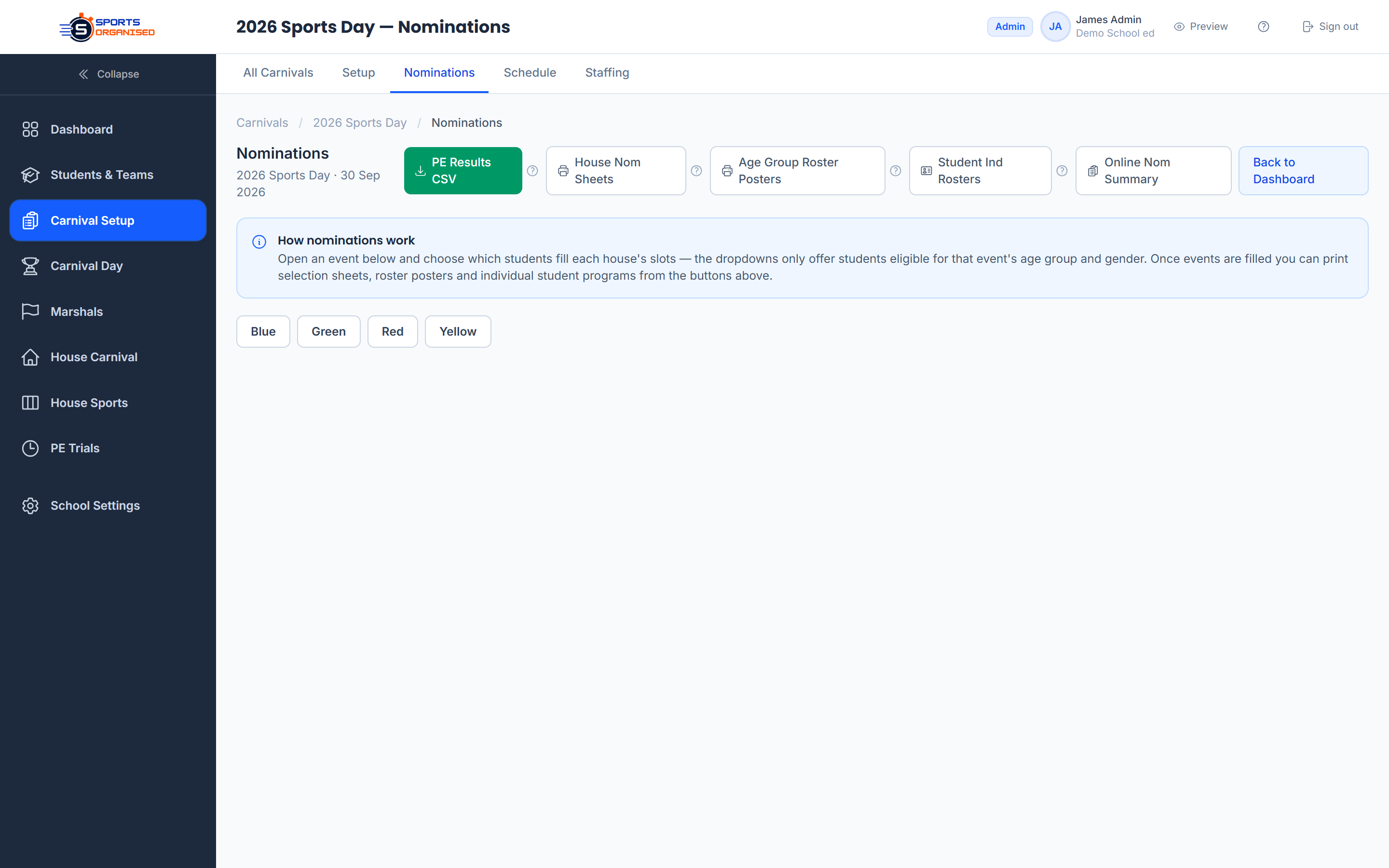
Staff Nomination Manager

Accordion view — events grouped by age group with nomination count badges per house
House switcher — admin can switch between any house; team managers are locked to their own house
Student eligibility service — checks age group match (age_based or year_based), active status, and de-duplication
Max per house enforcement — warns and blocks when a house reaches the per-event cap
Max per student enforcement — champion cap warning when a student approaches their event limit
Auto-sync — button to regenerate slots for events with auto_nominate_all enabled
Idempotent slot generation — creating or re-importing events never duplicates existing nominations

Self-Nomination Public Portal

Unique token URL per carnival — no login required, shareable via email or school app
Optional open/close date gates — nominations automatically blocked outside window
Student matching — first + last name case-insensitive match against student records
Age group validation — student is shown only events matching their age bracket
Max events cap — students cannot exceed the configured self-nomination limit
Duplicate prevention — repeat submissions update, not duplicate, existing nominations
Confirmation page — student sees a full summary of their submitted events
Admin summary view — download/print a self-nomination summary by house and age group

Nomination Print-Outs

Selection Sheets

One page per age group per house. Students down left, events across top. Blank cells for manual on-day ticking.

Rosters

House roster per age group showing nominated events per student. Includes event time and location headers.

Student Programs

4 cut cards per A4 sheet. Each card lists the student's nominated events sorted by event number — handed out on carnival day.

Self-Nomination Summary

Age group × house breakdown of all self-nominated students and events. Downloadable and printable.

Screenshot: Nomination manager with house and age group breakdown

Race Day Operations

Dedicated views for marshals, recorders, and field event coordinators

Starter Marshal View

Event and heat selection, student-to-lane assignment, eligible student dropdowns filtered by age/gender, race group management, and event lock/unlock controls.

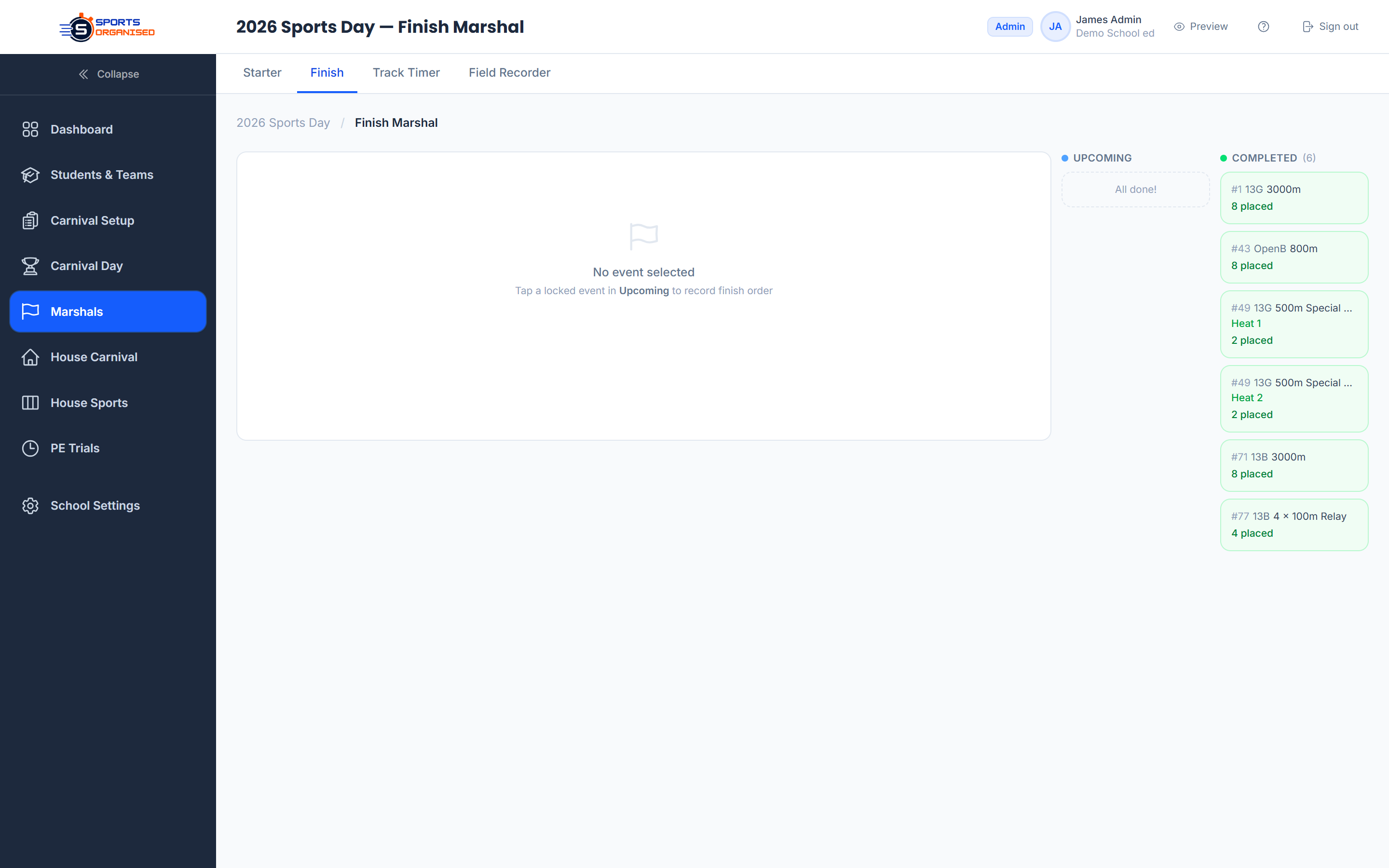
Finish Marshal / Recorder View

Sequential place entry (1st, 2nd, 3rd …), DSQ marking with reason, edit mode to revise finishes, and race group bulk finishing.

Field Events View

Field event roster, completion status display, and direct link to per-event results entry for attempts and best-result tracking.

Results Entry — Individual

Time input (min:sec.cs) or distance (m.cm), multi-attempt tracking for field events, foul marking, DSQ handling, participation-only toggle, standards zone selection.

Results Entry — Team

House-based result rows. Time-based, position-based or points-based scoring depending on event configuration.

Auto Place & Points

On batch save: places auto-assigned from result values, points looked up from the carnival points table, record-break alerts displayed instantly.

Record Breaker Detection

When a result beats the stored event record, the system highlights the record break in the results entry view — showing old value, new value, student name, and house. The new record is stored automatically with student name and date for the carnival archive.

Screenshot: Finish marshal results entry view

Scoring, Live Displays & Results

Real-time leaderboards, age group champions, and public results sharing

House Leaderboard

Aggregate house points across all completed events. Multi-division support separates individual vs relay scoring if required.

Age Group Champions

Top scorer per age group based on individual event points. Configurable max events cap (only top N events counted). Division-filtered.

Record Breakers View

List all carnival records broken, grouped by event type. Shows old record, new record, student name, house, and dates.

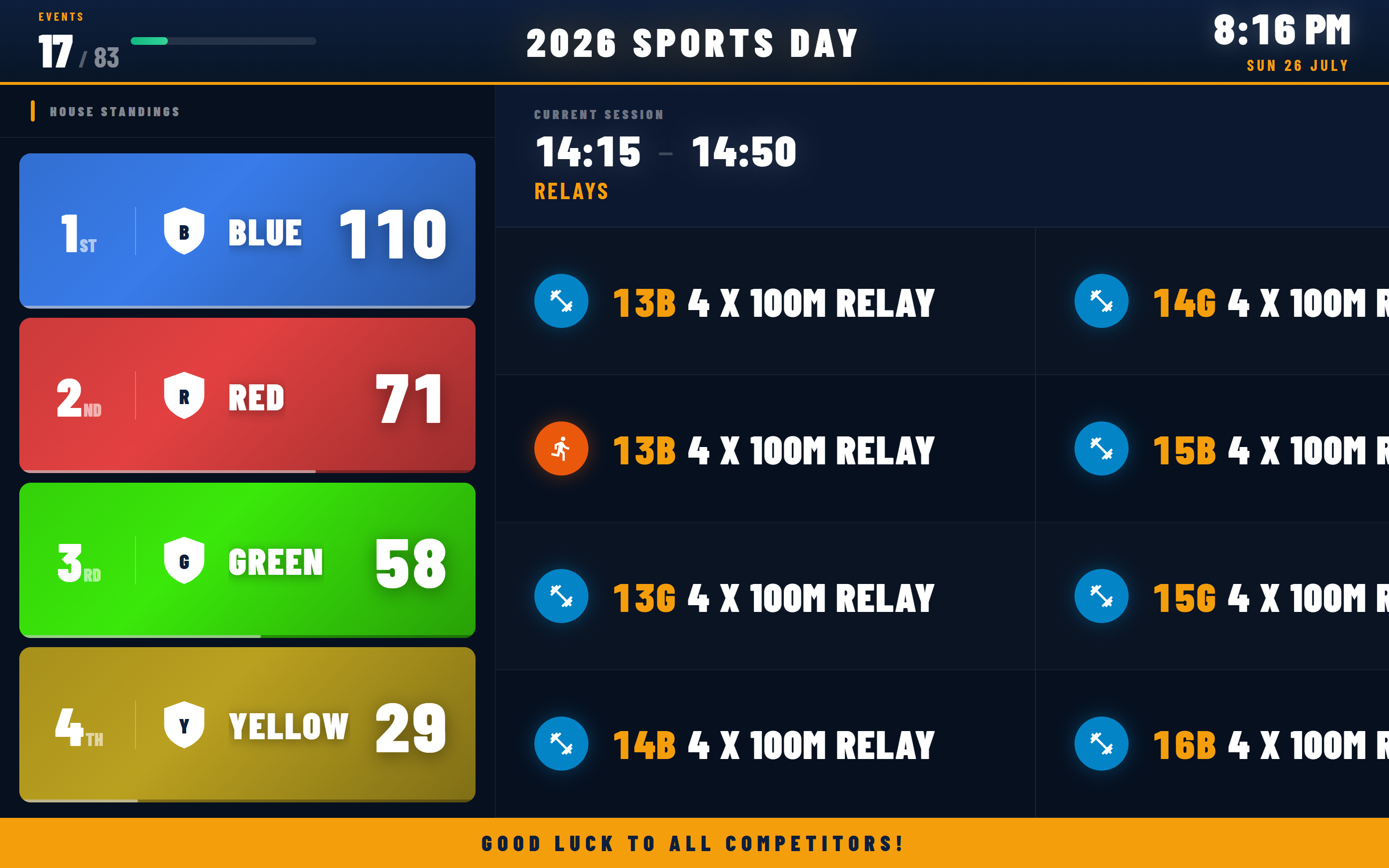
Big Screen Display

Full-screen leaderboard designed for projector display. House rankings, current event block, completion progress. Auto-refreshes every 30 seconds.

Public Results Portal

Shareable token URL — no login required. Four tabs: Leaderboard, Events, Records, Schedule. Live-polling every 30 seconds. Perfect for parents following along.

Results CSV Export

Export full results: event number, event name, age group, gender, student, house, place, result, points. Sorted by event. Audit logged.

House Points by Age Group Export

Download a CSV grid of house points broken down by age group — rows are age groups, columns are houses. Includes per-house totals, per-age-group totals, and a grand total row. Audit logged for compliance.

Screenshot: Big screen live leaderboard display

PE Trials Module

Unique to SportsOrganised — connect PE class assessment directly to carnival nominations

The PE Trials module is a complete pre-carnival assessment tool built into SportsOrganised. Teachers run sprint, jump, and throw sessions in class, record results in a live spreadsheet, and those results feed directly into carnival pre-selection — all without leaving the platform. No other Australian carnival management product offers this.

PE Classes

Class CRUD — Create PE classes with name, trial year, applicable year levels, and active status.
Student Enrollment — Assign students to classes from their profile or in bulk. Synced on save.
Teacher Assignment — One or more teachers per class. Teachers can only enter results for their own assigned classes.
Bulk Create — Create multiple classes in a single form — useful for setting up Year 9 and Year 10 cohorts at the start of the trial period.

PE Events

Event Types — Timed (sprint, 40m, 100m) or distance (long jump, shot put). Configurable attempt count per event.
Sort Order — Control the display order of events on the results entry sheet.
Active Toggle — Deactivate retired events without deleting historical data.

Sessions & Results

Session CRUD — Create sessions with date, time, location, notes, and assigned PE events.
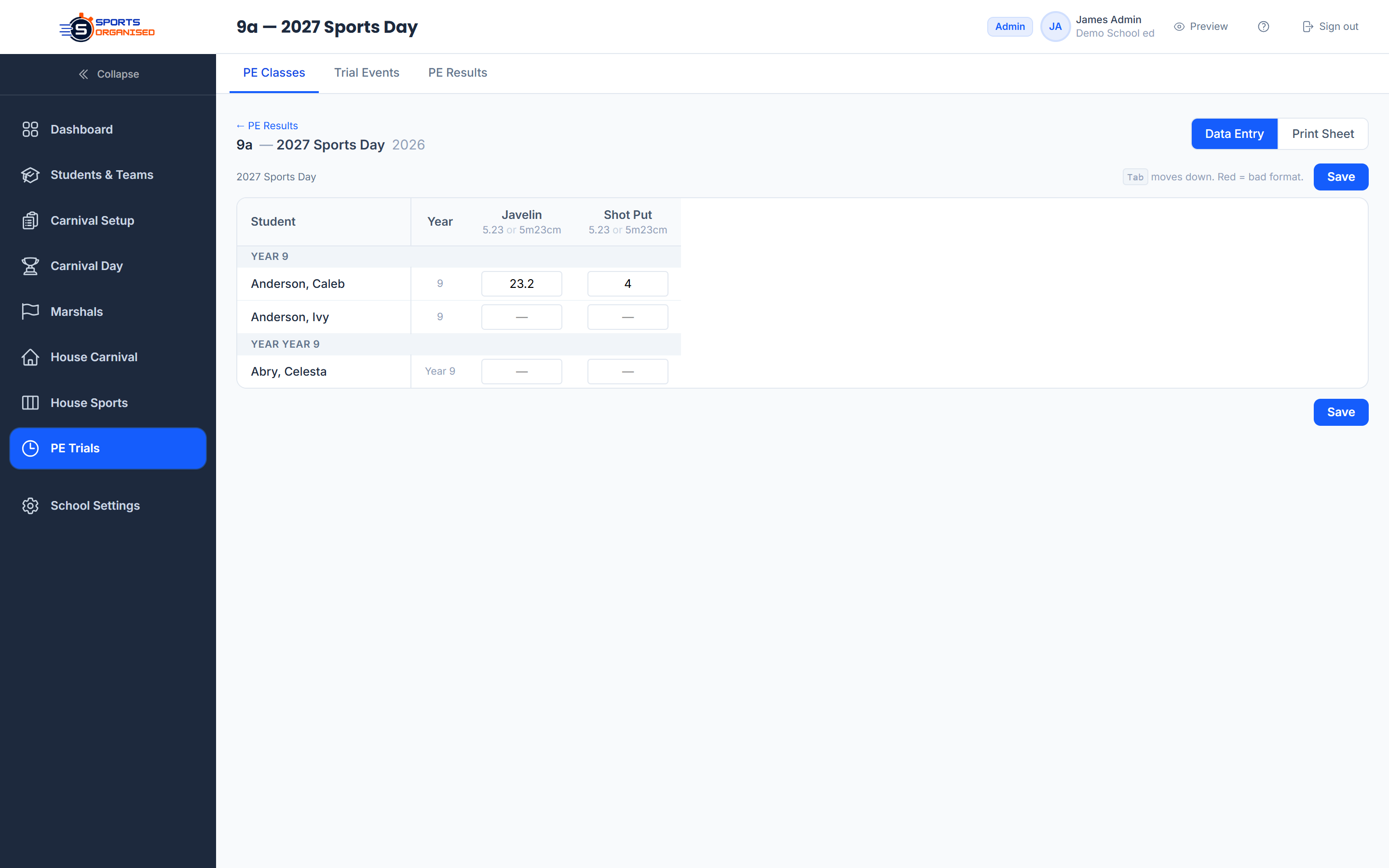
Live Results Grid — Spreadsheet-style entry: students down the left, events across the top. Enter results inline with live best-result calculation.
Bulk Save — All results saved atomically in a single submission — no partial saves.
Teacher-Scoped Access — Teachers can only view and enter results for classes they are assigned to. No access to other classes.
Results Export — Filter by year level, gender, house, and PE event. Export best results per student per event to CSV for carnival pre-selection.
Export for Carnival — Download PE trial results mapped to carnival events for direct use in nominations — bridging trials and carnival day seamlessly.
Screenshot: PE trial results spreadsheet entry

House Sports & Season Competitions

Round-robin season management for netball, basketball, volleyball and any team sport — with finals and a live ladder

Beyond carnival day, SportsOrganised manages the full term-based house sports season. Create competitions for any sport, split teams into divisions, auto-generate a round-robin fixture list, track a live ladder, and progress to semi-finals and a grand final — all without any manual scheduling maths.

Season Competitions

Competition Setup — Name, sport (any team sport — netball, basketball, volleyball, soccer, touch footy…), season label (e.g. "Term 2 2026"), status lifecycle (draft → active → completed), and optional coordinator notes.
Multi-Division Support — Split a single competition into multiple divisions — Junior Boys, Senior Girls, Mixed, Open — each with its own enrolled houses, independent fixture list, and separate ladder.
House Enrolment per Division — Checkbox enrolment of school houses into each division. Houses can compete in some divisions but not others.
Competition Dashboard — Index page shows all competitions with sport, season, status, division count, and per-division ladder leaders in one view.

Fixtures & Scheduling

Auto Round-Robin Generation — One click generates a balanced round-robin for all enrolled houses, single or double round. Odd-number house groups receive a bye round. Existing scored fixtures are never overwritten.
Auto-Dated Rounds — Set a round-1 date, match time, and weekly or fortnightly interval — every round is dated automatically. Give a division its own weekday and time, and unplayed fixtures re-date themselves whenever you change the schedule.
Bye-Round Handling — When a division has an odd number of houses, byes are inserted automatically and displayed clearly in the fixture list without counting toward ladder points.
Print Pack — Per-division schedules, a one-page game roster (rounds × divisions), and blank score sheets for every unplayed match — pick tally-grid or freeform layouts. Everything a coordinator needs on paper, one click each.

Live Ladder / Standings

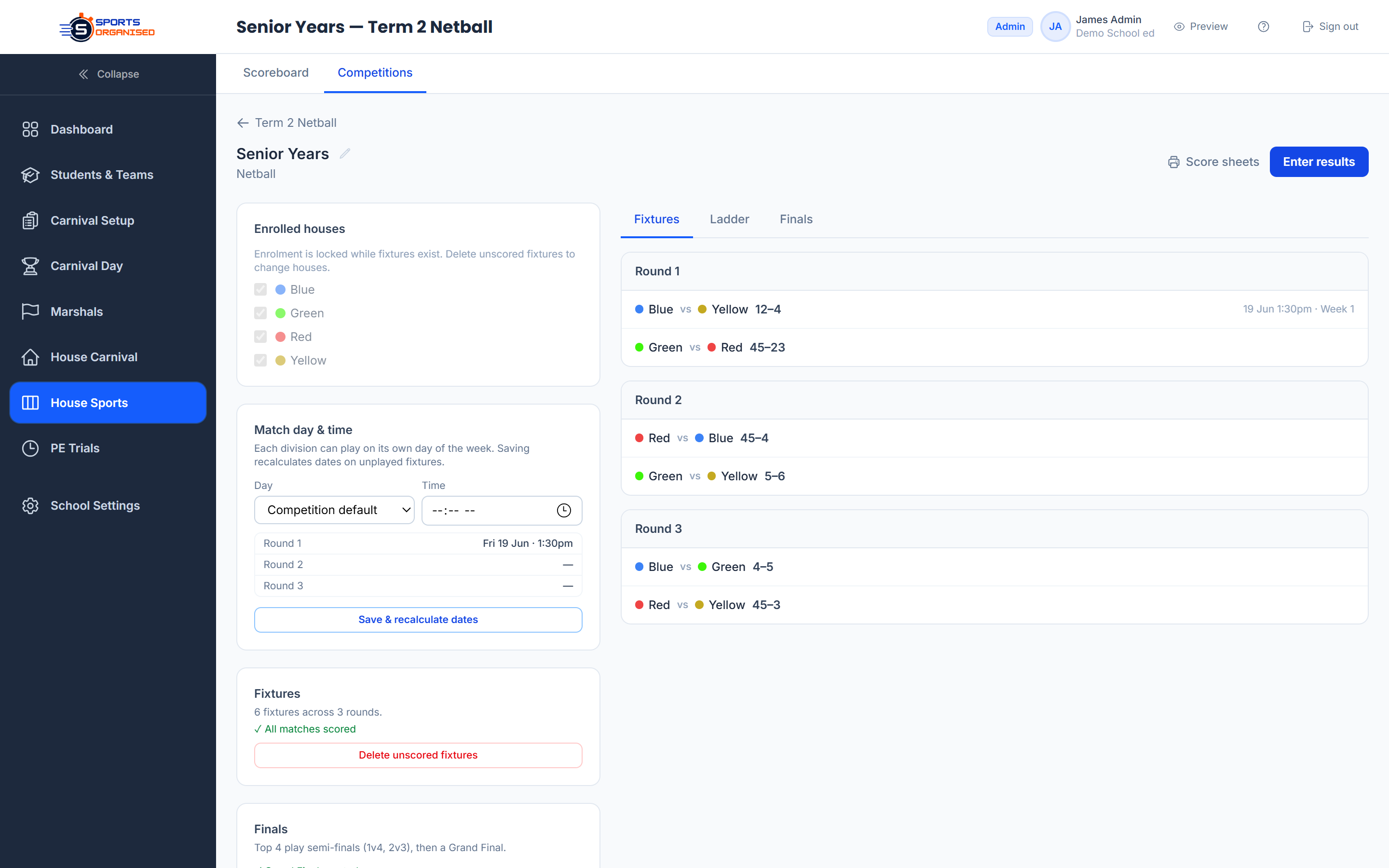
Full W/D/L table with Played, Wins, Draws, Losses, Goals For, Goals Against, Goal Difference, and Points. Updates the moment a result is saved. Leader highlighted in amber.

Results Entry (Livewire)

Side-by-side layout: live ladder on the left, all rounds on the right. Enter home and away scores for any match, save all changes in one action. Ladder recalculates instantly.

Forfeit Tracking

Mark either the home or away house as forfeiting. Score fixed at a standard forfeit result, match excluded from goal-difference ranking, forfeit badge displayed in all views.

Semi-Finals Draw

Once regular-season matches are scored, generate semi-finals in one click — top-2 vs 3rd/4th from the ladder. Appears as a separate Finals tab in the division view.

Grand Final

After semi-finals are scored, generate the Grand Final. Results entry works identically to regular matches — no separate interface needed.

Tabs: Fixtures / Ladder / Finals

Division page uses Alpine.js tabs so coordinators can flip between the fixture list, the current ladder, and the finals bracket without leaving the page.

Annual House Results Board

Aggregate points from carnivals, house sport seasons, PE trials, and any other school activities into a single annual house points board. Create named boards (e.g. "2026 Annual Points"), add custom category rows (Carnival, Swimming, Netball, Basketball…), enter points per house for each row, and see running totals update automatically.

Board CRUD — Create and name boards per year. Multiple boards supported.
Custom Rows — Add rows for any activity — carnivals, house sports rounds, special events.
Live Totals — House column totals recalculate on every save. Visual overview at a glance.
Screenshot: House sports division fixtures and ladder

Staffing & Volunteer Management

Coordinate your entire volunteer team from availability through to briefing sheets

Staff CRUD

Create staff members with first name, last name, position/title, email, phone, and house assignment. Active/inactive toggle. Bulk CSV import.

Availability Grid

Staff × schedule modules matrix. Toggle availability per person per time block, or mark someone available all day in one tap. Visual overview of who is free when.

Teams by Location

Named colour-coded teams (e.g. "Red Team – Finish Line") tied to a location. Assign staff and attach the schedule periods each team covers.

Stint Wizard

Step through periods and staff availability to stage team allocations quickly, without hand-building every assignment.

Roster Matrix

Complete carnival staff roster with absence marking and a swap-replacement flow — cover a no-show on the day without losing the plan.

Briefing Sheets

Print-ready briefing documents per team or module — timings, location, assignments, and contact details, ready for the pre-carnival brief.

Screenshot: Staff roster and schedule matrix

Security & Compliance

Student PII protection, multi-tenancy, 2FA, and full audit logging

Data Protection

Multi-tenant isolation — Every per-school table uses a tenant_id global scope. One school's data is never visible to another — enforced at the database query layer.
No PII in URLs — Student names and codes are never exposed in URL parameters. All identifiers use opaque integer IDs.
Soft-delete guards — Students and events with associated results cannot be hard-deleted. Audit trail is always preserved.
Audit log — All create, update, delete, export, and login events recorded with user_id, tenant_id, action type, subject, and changes JSON.
Data breach policy — Published breach notification policy with response timeline. Available at /policies.

Authentication

Email + password login — bcrypt hashing, remember-me support, temporary password with expiry, forced change flag on first login.
Microsoft Azure AD SSO — OAuth flow via Microsoft Entra ID. Per-tenant client ID and secret. azure_oid stored on user record for cross-tenant prevention.
TOTP Two-Factor Auth — QR code enrollment, 6-digit TOTP challenge on login. Per-user enrollment. Admin can reset a user's 2FA without deleting their account.
Trusted devices — After passing 2FA, staff can trust a device. Subsequent logins from that browser bypass the 2FA challenge.
Role-based access control — Six roles (super_admin, admin, marshal, recorder, team_manager, teacher) with granular per-permission middleware on every route.
SSO-only enforcement — Per-tenant setting to block password logins entirely, forcing all staff through Azure AD.

Ready to see it in action?

Get started with SportsOrganised and run your next carnival with confidence.